Picsart Flow: one canvas, every AI model, no code required.
Picsart today unveiled Flow, a no-code AI workflow tool that lets creators build, connect, and automate entire creative pipelines on one visual canvas. Rather than jumping between separate apps for image generation, video creation, and editing, users can now assemble every step of a project from first prompt to final asset in a single, shareable workspace.
The launch positions Picsart squarely at the center of a fast-moving shift in creative software: instead of treating AI models as standalone destinations, Flow treats them as interchangeable components inside a broader production pipeline, one that a solo creator or an entire brand team can design once and reuse indefinitely.
One Canvas, Every Leading AI Model
Flow’s core promise is consolidation. Instead of forcing creators to manage subscriptions and workflows across multiple AI providers, Flow brings together an extensive roster of models spanning image, video, text, and sound in one place.
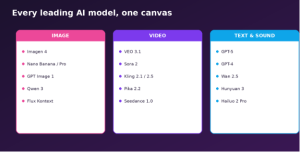
Flow’s model library spans image, video, text, and sound generation.
Image models
- Imagen 4 – best for highly creative visuals
- Nano Banana Pro / Nano Banana 2 (Gemini 2.5) – best for combining, editing, and generating with high speed and strong prompt control
- GPT Image 1 – best for generative image editing
- Qwen 3 (Max and Pro) – best for text rendering and detailed prompts
- Flux Kontext (Pro & Max) – best for image editing and resizing
Video models
- VEO 3.1 – best for realism and voice/sound
- Sora 2 – best for vertical clips and lip syncing
- Kling 2.1 and 2.5 (Turbo) – best for high-quality video from images or prompts, at high speed
- Pika 2.2 / PikaScenes – best for quick, multi-scene, cinematic video generation
- Seedream 4.0 / Seedance 1.0 – best for 4K storyboarding and narrative control
Text & sound
- GPT-5 / GPT-4 – best for premium visuals, creative storytelling, and image-to-image work
- Wan 2.5 – best for realistic audio matching
- Hunyuan 3 – best for realism and fine detail
- Hailuo 2 Pro – best for fast, basic shot generation
Each model is positioned for a specific creative strength, giving users a menu of specialized tools rather than a one-size-fits-all generator and letting a single workflow route different steps to whichever model does that step best.
Built-In AI Copilot Removes the Technical Lift
At the center of the new release is Copilot, a built-in AI layer that configures workflows on a user’s behalf. Creators can describe what they need in plain language, and Copilot selects the right models, wires up the steps, and handles the technical setup automatically turning what used to require manual configuration into a conversation.
This matters because workflow automation tools have historically demanded some degree of technical fluency: understanding APIs, chaining logic, or at minimum learning a new interface’s node system. Copilot is Picsart’s answer to that barrier, aiming to make the power of a multi-model pipeline accessible to someone who has never built one before.
How Flow Works
Picsart designed Flow around a simple, repeatable structure so a workflow built once can be reused, shared, or remixed indefinitely.
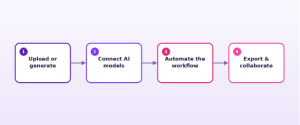
A Flow project moves from raw input to a finished, shareable asset in four stages.
- Upload or generate – start with your own content or create something new with AI to kick off the project
- Connect AI models – chain image, video, text, and sound models together on the canvas
- Automate the workflow – let the pipeline run the same steps automatically on new inputs
- Export & collaborate – package the workflow to share, reuse, or hand off to teammates
Designed for Solo Creators and Teams Alike
Flow is built around several core capabilities:
- Infinite creative freedom – an open canvas for ideating, designing, and connecting AI models without constraints. There’s no fixed template forcing a particular structure; the canvas grows with the project.
- No-code workflow design – visually create, connect, and run processes without technical setup, so the barrier to building a multi-step pipeline is close to zero.
- Ready-made templates – community-built, remixable workflows for repeatable projects, so creators don’t have to start from a blank canvas every time.
- Real-time collaboration – multiplayer editing, live chat, and commenting inside a shared canvas, built for teams of every size working on the same project simultaneously.
- Automatic scene continuity – consistent lighting, characters, and audio across scenes, so a story flows smoothly from the first frame to the final cut.
- Creative workflow automation – streamlining everything from asset creation to design optimization, cutting the manual busy-work out of repeatable projects.
Real-World Use Cases
Picsart positions Flow as a general-purpose creative engine rather than a single-purpose tool. According to the company, teams are using it to:

Flow supports a wide range of creative production use cases out of the box.
- Design ads – build complete ad creative sets across formats and sizes from one workflow
- Create branded assets – generate on-brand visuals at scale for marketing and social
- Localize campaigns – adapt creative for different markets and languages without rebuilding from scratch
- Remix visuals into videos – turn static assets into motion content using the same pipeline
- Build brand identity systems – develop a consistent visual language from the ground up
Bring Flow Into Your Existing Tools
Flow isn’t limited to Picsart’s own web app. The company has also opened up integrations so that Picsart’s models and workflows can be used inside the AI tools and environments people already work in:
- ChatGPT / Codex – bring Picsart generation into an existing ChatGPT workflow
- Claude – connect via MCP for use inside Claude-based workflows
- Cursor and terminal / command line – call Picsart generation from a coding environment via MCP or CLI
- Google Drive – access Picsart’s photo editing and design tools directly from Drive files
Availability
Picsart Flow is available now and accessible using AI Credits, which are included with all Picsart subscriptions or available as standalone packs. The tool is also accessible on mobile and desktop through Picsart’s apps for iOS, Android, and Windows, in addition to the web platform.
Teams and individual creators can use Flow to design ads, build branded assets, localize campaigns, remix visuals into video, and develop brand identities from the ground up all without switching between disconnected tools.
Frequently Asked Questions
What is Picsart Flow? An AI workflow tool that lets you ideate, iterate, and automate designs on a single visual canvas a no-code workflow builder for solo creators or teams.
How does it work? Start with your own content, a quick prompt, or a workflow template. Connect images, videos, text, and sound, then package the result as a reusable workflow.
Can teams collaborate in Flow? Yes, real-time collaboration lets teams co-create on the infinite canvas, chat directly in the tool, and build workflows together from anywhere.
Is Flow free to use? You can start creating using AI Credits, which come included with all Picsart subscriptions, or purchase them as one-off packs.
What kinds of workflows can I build? Ads, branded assets, campaign localization, video remixes, and full brand identity systems, among many others.
Learn more or start building at picsart.com/flow
This post is based on publicly available information from Picsart’s website as of September 2026. Illustrations in this document are original graphics created for this post and are not Picsart product screenshots.
